For years, creating video meant choosing a format and sticking with it.
You recorded horizontal video for YouTube.
You recorded vertical video for social media.
And if you wanted both… you either filmed twice or spent hours cropping and editing. But today’s video landscape has changed.
Creators, businesses, educators, and entrepreneurs are publishing across multiple platforms and every platform prefers a different format.
YouTube favors horizontal video.
TikTok and Instagram prefer vertical video.
LinkedIn works with both.
Which leads to a frustrating question: Which aspect ratio should you record in? The answer is: both.
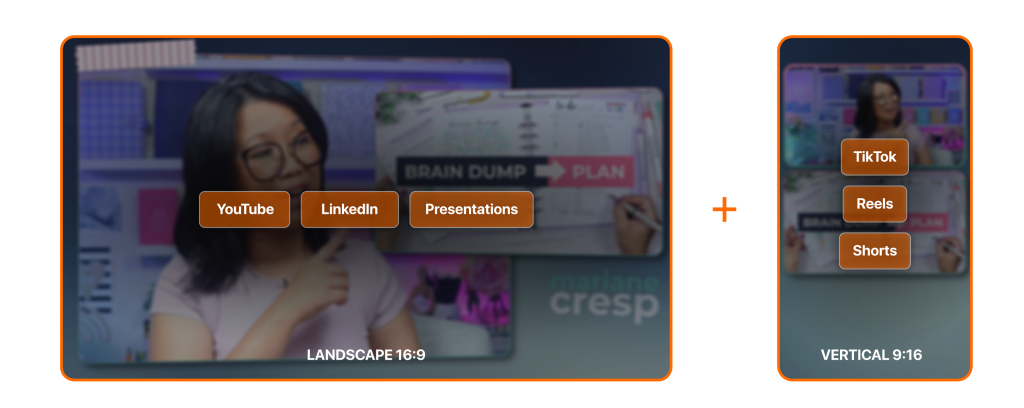
And now, you can create both formats at the same time, while designing each one intentionally.
Ecamm doesn’t just convert your video from horizontal to vertical. It lets you fully design both layouts so each format looks polished and platform-ready, without cropping, reframing, or post-production edits.
The Problem With Choosing Just One Aspect Ratio
Most creators still build their entire video workflow around a single format. That creates problems almost immediately.
Horizontal-only content gets awkwardly cropped for social
When you try to repurpose a horizontal video for vertical platforms, you often end up with:
• Cropped faces
• Missing visual elements
• Awkward framing
• Important content cut off
Your video technically fits the platform, but it rarely looks good.
Vertical-only content limits your reach
If you record only vertical video, it works well for:
• TikTok
• Instagram Reels
• YouTube Shorts
But it becomes difficult to use for:
• YouTube long-form content
• Webinars
• Podcasts
• Courses
• Professional presentations
Vertical video can feel limiting when you want to create deeper, longer content.
Recording twice wastes time
Some creators try to solve this by recording twice.
Once for horizontal.
Once for vertical.
That means:
• Double the setup
• Double the recording time
• Double the editing work
And if you’re recording interviews, live shows, or webinars, it’s often impossible to recreate the same moment twice.
The Better Solution: Create Both Formats at Once
Instead of choosing between horizontal and vertical video, modern creators are producing both simultaneously.
This allows you to:
• Record a full horizontal show or podcast
• Capture vertical clips for social media
• Repurpose content faster
• Publish everywhere without additional recording
This workflow is becoming essential for anyone creating video regularly. And now, Ecamm makes it incredibly easy.
Introducing Dual Mode in Ecamm
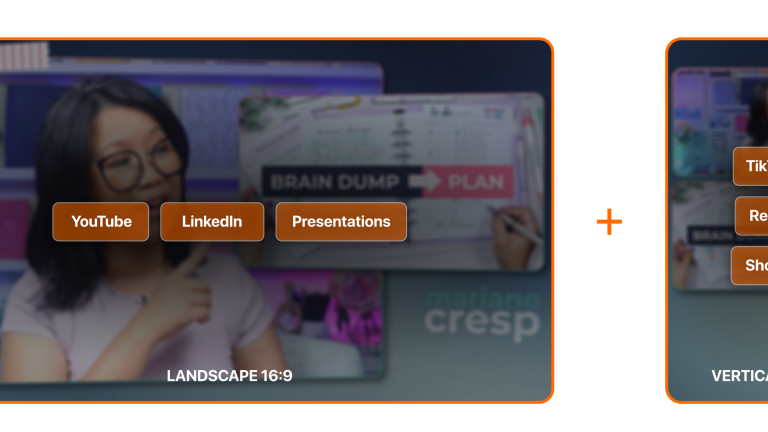
With Dual Mode, Ecamm lets you create horizontal and vertical video at the same time inside a single production.
You can design:
• A 16:9 horizontal layout for YouTube, podcasts, and webinars
• A 9:16 vertical layout for TikTok, Instagram, and Shorts
Both versions run simultaneously during your recording or live stream.
That means you can:
• Record both versions at once
• Stream both versions
• Produce clips instantly
• Repurpose content without extra editing
Instead of building separate productions for each platform, you design both layouts once and Ecamm handles the rest.
Why Ecamm’s Dual Mode Is Different
Other tools often try to solve this problem after the fact.
They rely on:
• Auto-cropping
• AI reframing
• Post-production editing
Those tools can help, but they rarely give you full control. Ecamm approaches the problem differently.
1. You design both layouts intentionally
With Dual Mode, you build your horizontal and vertical scenes yourself.
That means you control:
• framing
• overlays
• guest placement
• graphics
• branding
Nothing gets randomly cropped or guessed by AI. Your video looks exactly how you designed it.
2. Everything happens in one studio
You don’t need:
• multiple cameras
• multiple productions
• separate software tools
Ecamm runs your entire production from one interface.
Your guests, cameras, overlays, and graphics can feed both formats at once.
It’s a true video production studio on your Mac.
3. It works for live AND recorded video
Many multi-format tools only work after recording. Ecamm works during production.
That means you can:
• live stream horizontally while capturing vertical clips
• record podcasts and social content simultaneously
• run webinars while creating vertical marketing clips
Your content is ready to publish the moment you’re done recording.
Who Dual Mode Is Perfect For
Dual Mode unlocks a smarter workflow for many types of creators.
Podcasters & Live Shows
Record your full podcast or show in horizontal while automatically producing vertical clips for promotion.
YouTubers
Create long-form videos while capturing vertical versions for Shorts.
Coaches and Educators
Turn webinars and lessons into vertical social content without re-recording.
Entrepreneurs and Business Owners
Record once and publish everywhere your audience spends time.
The Future of Video Is Multi-Format
Video platforms aren’t moving toward one universal format. They’re moving toward many formats.
Creators who adapt their workflow will:
• publish more consistently
• reach more audiences
• repurpose content faster
• grow their presence across platforms
Instead of choosing between vertical and horizontal… the smartest creators are building systems that produce both simultaneously.
Create Once. Publish Everywhere.
With Dual Mode in Ecamm, you no longer have to choose a format before you hit record. You can design both. Record both. And publish everywhere your audience watches video.
If you’ve ever struggled with cropping, resizing, or re-recording content just to fit different platforms, Dual Mode changes everything.
Try Ecamm Dual Mode and start creating video that works everywhere.