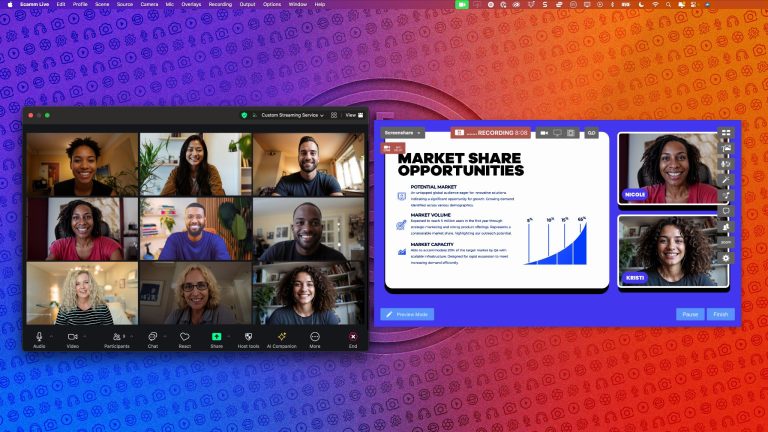
If you use Zoom every day, there’s a good chance you’re only using a fraction of what the platform can actually do.
For most people, Zoom is “the meeting app.” But for creators, coaches, podcasters, educators, and live streamers, it has quietly evolved into something much bigger: a full virtual production ecosystem.
In a recent conversation, the team at Ecamm sat down with the Head of Zoom’s Innovation Team, Andy Carluccio, to talk about the future of professional virtual video production, including:
- Zoom’s new Enhanced Media add-on
- How to get 1080p and 60 FPS in Zoom
- Why creators are using Ecamm for Zoom
- New tools like ZoomISO v3
- How Zoom is becoming a true creator platform
If you want your interviews, webinars, podcasts, and virtual productions to look more polished and professional, here’s what you need to know.
Zoom Is No Longer Just a Meeting Platform
Most people still think of Zoom as a video conferencing tool, but the platform has expanded dramatically over the last few years. Today, Zoom includes tools that many creators and businesses are already paying for separately:
Integrated Productivity Tools
- Whiteboarding for collaboration and teaching
- Team Chat for persistent communication
- Mail and Calendar integration
- AI Companion for meeting summaries, transcripts, and search
- Scheduling tools for appointments and bookings
For creators and entrepreneurs, this matters because fewer tools means:
- fewer subscriptions,
- fewer integrations,
- and fewer workflow headaches.
Why Creators Should Pay Attention to Zoom’s Production Tools
One of the biggest shifts discussed in the conversation was how aggressively Zoom is investing in professional production workflows.
This includes tools like:
- ZoomISO v3
- Production-ready APIs
- Gallery view enhancements
- Remote contribution workflows
- Higher-quality video transport
- Enhanced Media
For live streamers and producers, Zoom is increasingly becoming more than a “guest capture” platform; it’s becoming a legitimate production backbone.
That’s especially true when paired with Ecamm.
Why Use Ecamm for Zoom?
A common question creators ask is:
“Why should I use Ecamm for Zoom instead of just recording directly in Zoom?”
The answer comes down to production quality, control, and guest experience.
1. Your Guests Already Know Zoom
This is one of the biggest advantages.
When guests join a familiar platform, they feel comfortable immediately. There’s less troubleshooting, less anxiety, and fewer technical issues.
That means:
- better conversations,
- smoother interviews,
- and more authentic content.
Instead of forcing guests to learn complicated recording software, you can let them stay inside a platform they already trust.
2. Ecamm Gives You Full Production Control
Using Ecamm for Zoom allows you to pull:
- individual video feeds,
- isolated audio,
- and participant streams
directly into your production environment.
That means you can:
- customize layouts,
- add overlays and branding,
- improve audio,
- switch cameras,
- and create a professional broadcast experience
without placing any technical burden on your guests.
This is one of the reasons so many podcasters, coaches, webinar hosts, and live streamers use Ecamm as their virtual production studio.
3. Zoom Handles Scale Extremely Well
Zoom is built for large-scale communication.
You can host:
- webinars,
- live trainings,
- panels,
- conferences,
- community events,
- and collaborative productions
with large groups of people while maintaining a stable experience.
Pairing Zoom’s scalability with Ecamm’s production tools creates a workflow that feels far more professional than a standard meeting setup.
The Biggest Upgrade: Zoom Enhanced Media
For years, getting high-quality video inside Zoom required what many creators jokingly called a “secret handshake.”
If you wanted 1080p, you usually had to:
- upgrade to a business account,
- contact support,
- submit a request,
- and hope it was approved.
That process is finally changing.
What Is Zoom Enhanced Media?
Zoom Enhanced Media is a new add-on designed specifically for professional-quality video production.
It unlocks:
- 1080p HD video
- 60 FPS video
- Higher bitrate streams
- Better motion handling
- Improved gallery views
- Higher-quality participant feeds
For creators, this is one of the most important updates Zoom has introduced in years.
Why 1080p and 60 FPS Matter
Andy broke video quality down into three simple concepts that every creator should understand.
Resolution
Resolution determines how much visual detail exists in the image.
Moving from 720p to 1080p creates:
- sharper faces,
- cleaner graphics,
- and more professional-looking video.
For interviews and webinars, the difference is immediately noticeable.
Frame Rate (FPS)
FPS stands for “frames per second.”
Most video calls operate at 30 FPS.
Enhanced Media enables 60 FPS, which creates:
- smoother motion,
- more natural movement,
- and a more broadcast-like feel.
It’s subtle — but once you notice it, it’s hard to go back.
Bitrate
Bitrate determines how much data is used to preserve image quality.
Higher bitrates help prevent:
- pixelation,
- compression artifacts,
- blurry motion,
- and muddy visuals.
This becomes especially important when:
- multiple guests are on screen,
- graphics are moving,
- or someone is sharing video content.
Key Takeaways for Creators Using Ecamm for Zoom
Keep both Ecamm and Zoom Updated
Both Ecamm and Zoom are constantly releasing new creator and production features. This means you need to keep your apps up-to-date.
If you haven’t updated recently, you may be missing:
- quality improvements,
- production tools,
- performance enhancements,
- and workflow upgrades.
Simplify Your Tech Stack
Before paying for another third-party app, check whether Zoom Workplace already includes the functionality you need.
Between:
- scheduling,
- AI tools,
- chat,
- collaboration,
- and production features,
many creators can consolidate their workflows significantly.
Focus on Guest Experience
The best interviews happen when guests feel relaxed and confident.
Using Zoom as the front-end experience while running production through Ecamm gives you:
- professional production quality,
- without intimidating your guests.
That balance matters.
Invest in Video Quality
If video quality is important to your business or brand, Zoom Enhanced Media is one of the easiest ways to improve your production instantly.
The jump to:
- 1080p,
- 60 FPS,
- and higher bitrate video
creates a noticeably more polished experience.
For podcasters, educators, streamers, and coaches, that production value can make a major difference.
Final Thoughts
Virtual production has changed dramatically over the last few years.
Today, creators no longer need:
- giant studios,
- expensive control rooms,
- or complicated broadcast infrastructure
to create professional-quality content.
By combining Ecamm and Zoom and tools like Enhanced Media, creators can build leaner, simpler, and more professional workflows than ever before.
Whether you host:
- interviews,
- webinars,
- podcasts,
- workshops,
- or live productions,
the tools now exist to make your virtual presence feel genuinely broadcast-quality. The future of virtual production is not just about meetings anymore. It’s about creating experiences.